Arduino CNC Drawing Machine
How to make a simple and high quality CNC drawing machine to draw on almost anything. I'll step you through how to build your own including all the files you need.
This project has a relatively low cost and can produce some very detailed drawings. I've used it to create t-shirts, cake decorations, drawings to colour in myself (and some it coloured in for me!). You could also use it to draw out scale drawings, wedding invitations, birthday and Christmas cards and anything else you can think of. :)
List of items used in this project and where to find them:
- 8 x15 x 45mm Linear Bearing (x2):
https://geni.us/LinearBearing45mm
- 8 x 15 x 25mm Linear Bearing (x1):
https://geni.us/LinearBearing25mm
- 12v Nema 17 stepper motors (x2):
https://geni.us/StepperMotor
- GT2 Timing belt and pulleys:
https://geni.us/TimingBelt5m
- Micro servo (x1):
https://geni.us/MicroServo
- Elegoo Arduino Uno (x1):
https://geni.us/ArduinoUno
- Nuts, bolts and screws (See list below):
https://geni.us/NutsAndBolts
- Stepper drivers - TMC2208 (x2):
https://geni.us/TMC2208
- Contact switch (x2):
https://geni.us/ContactSwitch
- Arduino CNC Shield (x1):
https://geni.us/ArduinoCNCShield
- 30mm 5V Fan (x1):
https://geni.us/30mm5vFan
- 8mm Chromed Steel Rod (35cm x2 & 5.5cm x1):
https://geni.us/8mmChromedSteelRod
- 30cm long linear rail with block (x1):
https://geni.us/LinearRail300mm
- Electrical wire:
https://geni.us/22AWGWire
- 12v power supply - 2A or greater (x1): https://geni.us/12VPowerSupply2A
- Barrel Connector - Female (x1): https://geni.us/FemalePowerBarrel
- 6mm Idler Wheel - 3mm Bore (1):
https://geni.us/6mmIdlerWheel3mmBore
- Wooden panel to mount project at least 36x42cm (I used an Ikea ‘LÄMPLIG’ chopping board)
Nuts, bolts and screws needed:
- M5 x 25mm (x2)
- M3 x 18 (x3)
- M3 x 12 (x2)
- M3 x10 (x3)
- M3 x 6 (X14)
- M3 nuts (x9)
- M5 nut (x1)
- Short wood screws (x8)
Downloads
The code and GRBL configuration can be downloaded from here: https://github.com/DIY-Machines/CNC-DrawingMachine
3D printed parts can be downloaded from here: https://www.prusaprinters.org/prints/94363-easy-3d-printable-cnc-drawing-machine-draw-on-cake
The drawings I created for use with my machine: https://geni.us/EtsyCNCDrawingFiles
Inkscape 0.48.5 for Windows: https://inkscape.org/release/inkscape-0.48/?latest=1
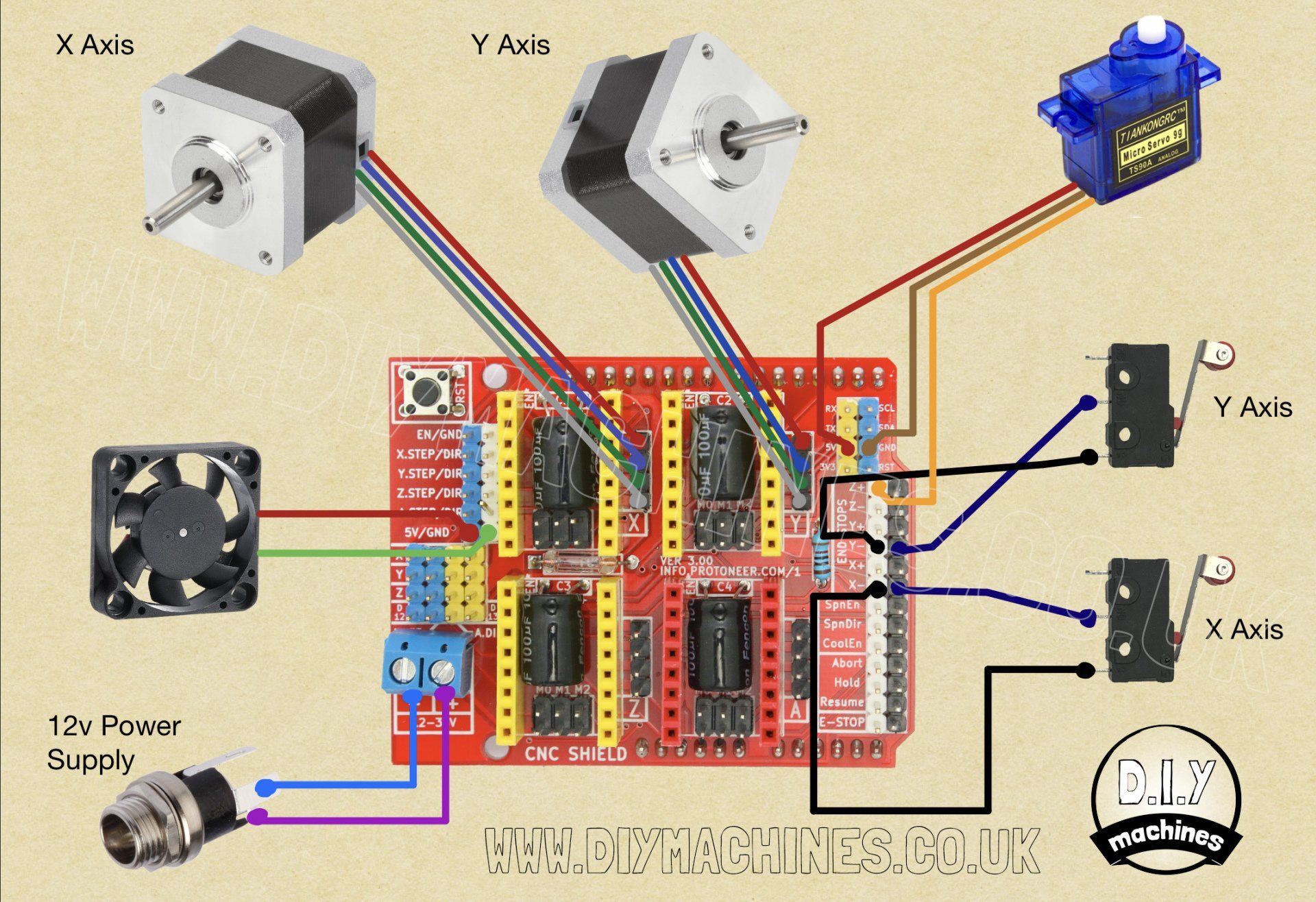
Wiring Diagram
FAQ
Comments